
Travel Library
China Internet, eSIM and Maps Guide (2026)
Prepare mobile data, verification SMS, maps and offline backups for China. Compare eSIM and roaming, set up essential apps, and test your arrival route.
Use this library after the relevant checker or planner when you want the deeper source context, Q&A, and background explanations behind the short tool result.
Check your phone setup first, then use the internet library.
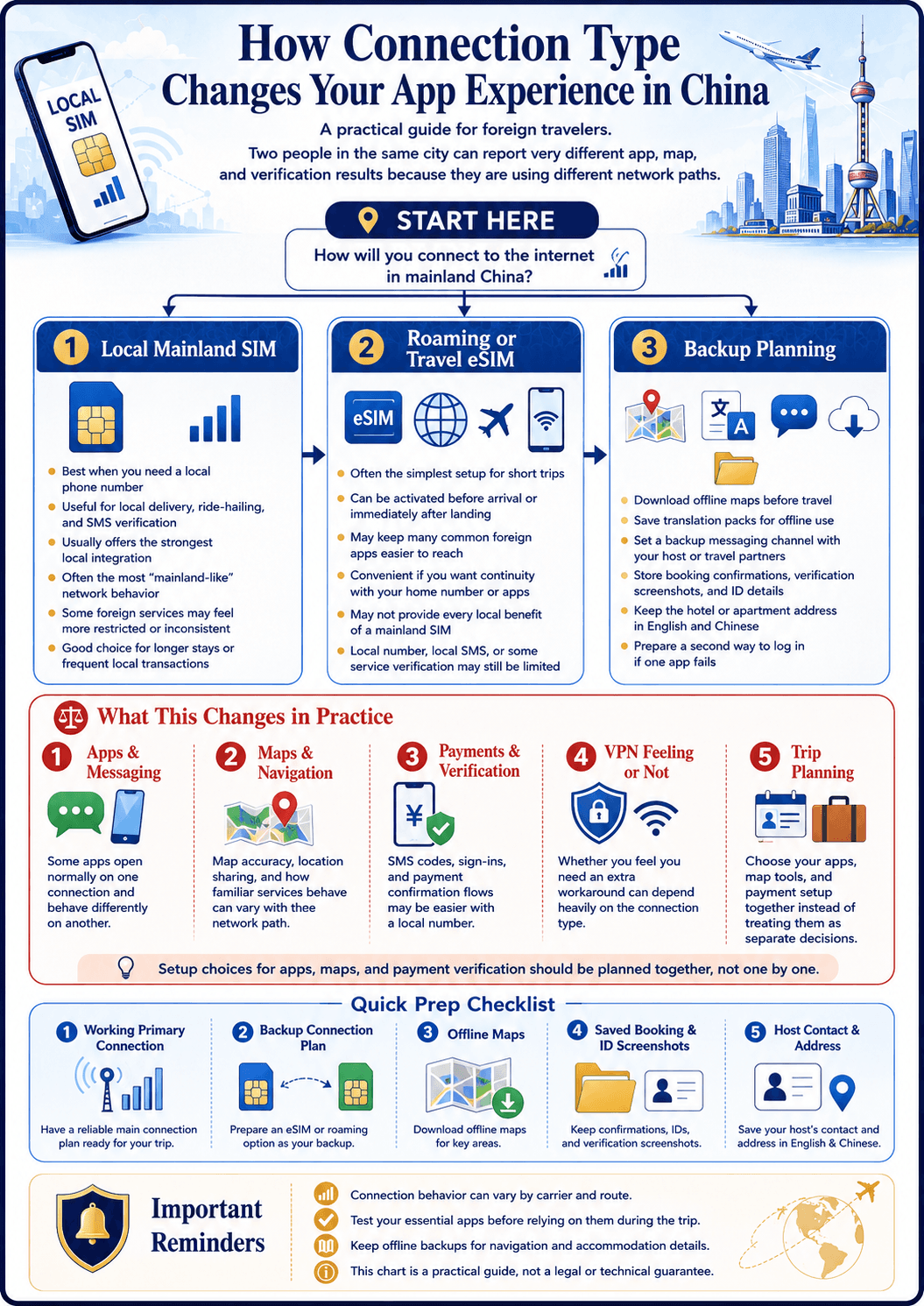
Mainland China's internet environment is different from most countries. A predictable set of apps and services — Google, Gmail, WhatsApp, Instagram, Facebook, YouTube — are blocked on mainland networks. That does not mean these tools are inaccessible, but it does mean your experience depends entirely on how you connect to the internet and which alternatives you prepare before landing.
The three network paths available to visitors are a local mainland SIM (blocked services stay blocked), roaming with your home carrier (most blocked services work, at roaming data rates), and a travel eSIM routed through Hong Kong or another non-mainland gateway (most blocked services work, at moderate cost). Understanding this distinction — that the network path determines what works, not your location in China — is the foundation of a reliable connectivity plan. This section covers every practical decision: whether you need a VPN, which apps to install before departure, how to navigate without Google Maps, and which translation tools save the most time on the ground.
Featured questions
High-intent answers
Recommended tools
Practical tools for this topic
Apps You Need in China
Filter essential China apps by task: payments, maps, translation, ride-hailing, messaging, booking, and pre-arrival setup priority.
ToolChina Travel Checklist
A free China travel checklist for entry documents, Alipay, mobile data, hotel check-in and arrival. Tick items on your phone or download a printable kit.
Recommended guides
Deeper reading for this topic
Set up the phone you will use on arrival
Start with four jobs: mobile data, account-verification messages, navigation and a backup when the phone is offline. Installing more apps does not necessarily solve these jobs.
- Choose data: compare eSIM and roaming.
- Keep verification SMS: check the phone-number requirements for Alipay.
- Find your hotel: prepare a China map and Chinese addresses.
- Save a backup: download the free first-trip starter kit.
Compare the actual plans available to your phone
| Option | Check before paying | Arrival-day backup | |---|---|---| | Home-carrier roaming | China coverage, daily charging rules, data allowance and SMS/call fees | Save the carrier's activation instructions and support route | | Travel eSIM | Exact device compatibility, carrier lock, activation trigger, data allowance, hotspot and whether voice/SMS are included | Keep your existing verification number reachable if the plan is data-only | | Local mainland SIM | Passport registration, shop hours, included calls/data and the services you need to reach | Save essential documents and a working alternative contact method |
Do not choose solely by trip length or assume that every eSIM has the same access to Google, WhatsApp or work services. Providers can route data differently. Nomad describes international routing for its own China plans; that does not establish what another provider or hotel Wi-Fi will do. Check your selected plan's current terms and contact support about essential services.
For an iPhone, Apple's travel-eSIM guide explains device and carrier-lock checks. Keep the home and travel lines clearly labelled, choose the intended data line, and check both carriers' roaming settings. Android setup depends on the exact model and carrier; use its manufacturer's instructions.
Prepare one real map journey
Shanghai's July 2026 guide describes Amap's multilingual visitor services, including English. The older advice that Amap is simply Chinese-only is no longer a useful starting point.
Before departure, open your map and rehearse your airport terminal to your actual hotel entrance. Check that the hotel pin matches the booking address, read the final walking segment, and save the Chinese hotel name, address and telephone number. A translated app screen cannot correct a wrong branch of a hotel chain.
Keep a screenshot or written address even when online navigation works. Show it to an official taxi driver or staffed service desk if map search or ride-hailing fails. See the Shanghai arrival guide for the difference between Pudong and Hongqiao.
Test the essentials before flying
- Install and open your chosen payment, map, messaging and translation apps.
- Confirm that the phone number used for account verification can receive messages on the trip.
- Download a supported translation language pack, then try a short translation in airplane mode. Individual features may still require data.
- Save the hotel address, booking references and emergency contacts in an offline location.
- Agree on a meeting point and contact method with travel companions.
If you need company email, MFA or a company VPN, ask your IT team to confirm the permitted setup and recovery method. A working consumer messaging app does not prove that company tools will work.
Use the connectivity checker to identify missing preparation, or the app finder to select apps by task. Neither requires buying a particular data plan.
Sources and scope
Reviewed 26 September 2026 from published guidance; this page does not claim an on-location test of every device, carrier or network.
All Internet questions
Sorted by most recently reviewed